
Lees die instruksies in Afrikaans.
1.
Start by selecting a payment option. We offer monthly, quarterly (per term) and annual payment plans and payments are processed through Payfast.
Through Payfast, you have several payment options, including card (debit and credit) payments, Samsung Pay, SnapScan and Instant EFT.
2.
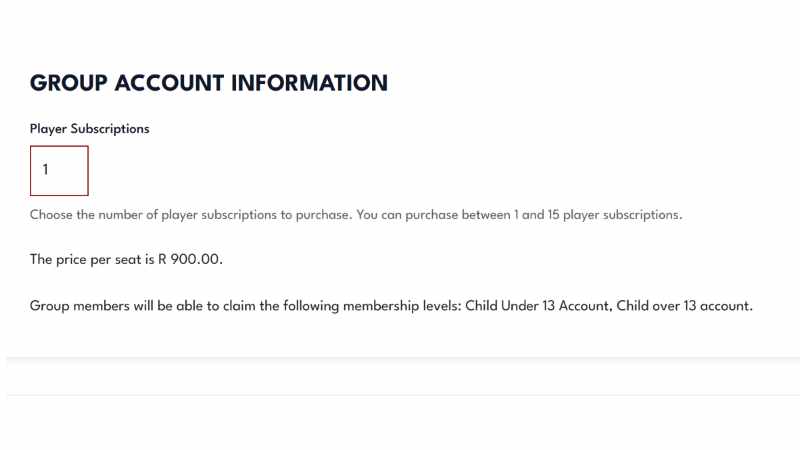
After selecting your payment option, ensure you select the correct number of subscriptions (also called “seats”) for the number of children registered with Connect NTK Youth. If you are only registering one child, you only need to select one seat.
3.
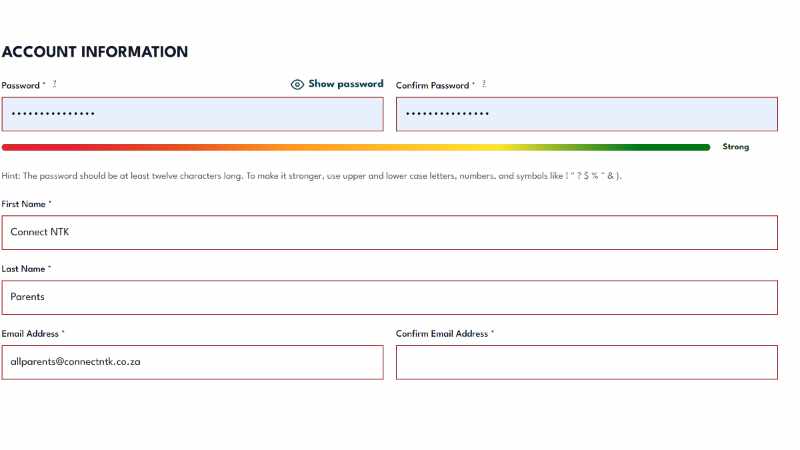
If you are not already logged in / do not have a registered account, you will be prompted to create one.
Fill your details (the details you will use to log into your account). A strong password, your name, surname and email address is required to register.
You will then be redirected to Payfast where you will enter your card details and complete your payment.
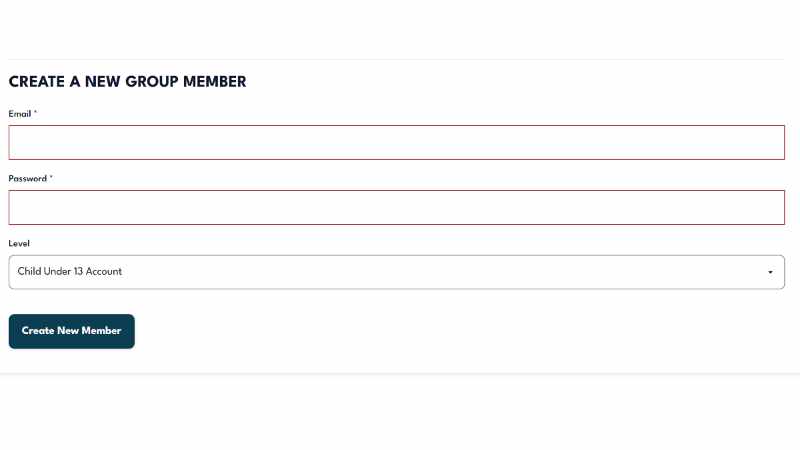
At the bottom of the page, you will have an option to “Create a new member” where you will need to fill in an email and a password and select a Level – Under 13 or Over 13.
Child accounts will only have access to the required registration form, the Connect NTK Events calendar and any player relevant announcements. You will still be required to sign the indemnity form and provide the required parental permissions.
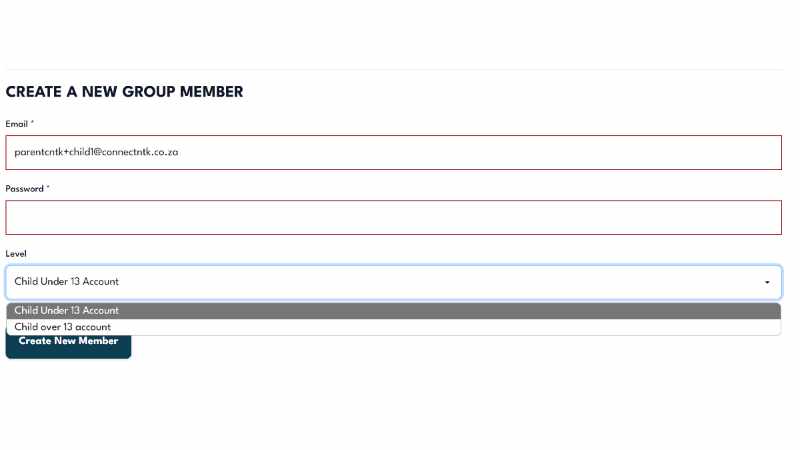
A unique email is required in order to register. For children without email addresses, or should you wish to manage their accounts yourself, you can simply append a plus (“+”) sign and any combination of words or numbers after your email address name (before the @ symbol). For example, if your email address is parentcntk@connectntk.co.za, you can use parentcntk+child1@connectntk.co.za and parentcntk+child2@connectntk.co.za for your second child etc.
This should work with most emails. If you have issues registering, please let us know.
Please note the password you selected as you will need this to login.
Bear in mind, if you opted not to process your membership through Payfast, you will not have access to this feature or be able to register your child until you have provided a proof of payment. Use the order refence number when making your payment. You will be responsible for making this payment every month. Your child will not be enrolled until proof of payment has been received and payment has cleared.
Hoe om te registreer
1.
Begin deur ‘n betaalopsie te kies. Ons bied maandelikse, kwartaallikse (per termyn) en jaarlikse betalingsplanne aan. Alle betalings word deur Payfast verwerk.
Payfast bied verskeie opsies, insluitend kaartbetalings (debiet en krediet), Samsung Pay, SnapScan en Instant EFT.
Quarterly
Per Year
Per Month
Maak asseblief seker dat jy die korrekte aantal intekeninge (ook genoem “seats”) kies vir die aantal kinders wat by Connect NTK Jeug geregistreer is.
Om net een kind te registreer, kies een sitplek.
As jy nog nie aangemeld is nie of nie ‘n geregistreerde rekening het nie, sal jy gevra word om een te skep. Vul jou besonderhede in (die besonderhede wat jy sal gebruik om by jou rekening aan te meld). ‘n Sterk wagwoord, jou naam, van en e-posadres is nodig om te registreer.
Jy sal dan herlei word na Payfast waar jy jou kaartbesonderhede sal invoer en jou betaling sal voltooi.
Nadat jou transaksie verwerk is, sal jy die opsie hê om “Manage your group” te gebruik – met ander woorde, die geregistreerde spelers.
Onderaan die bladsy sal jy ‘n opsie hê om ‘Create a new member’ waar jy ‘n e-posadres en ‘n wagwoord sal moet invul, asook om ‘n “Level” te kies.
Kinderrekeninge sal slegs toegang hê tot die vereiste registrasievorm, die Connect NTK Events-kalender en enige speler relevante aankondigings. Daar sal steeds van jou verwag word om die vrywaringsvorm te onderteken en die vereiste ouerlike toestemmings te verskaf.
‘n Unieke e-posadres word vereis om te registreer. Vir kinders sonder e-posadresse, of as jy eerder hul rekeninge self wil bestuur, kan jy eenvoudig ‘n plusteken (“+”) en enige kombinasie van woorde of syfers agter jou e-posadresnaam (voor die @-simbool) byvoeg. Byvoorbeeld, as jou e-posadres parentcntk@connectntk.co.za is, kan jy parentcntk+kind1@connectntk.co.za en parentcntk+kind2@connectntk.co.za vir jou tweede kind gebruik. Maak ‘n nota van die wagwoord; jy sal dit benodig om die registrasievorm in te vul. Dit behoort met die meeste e-posse te werk. Laat weet ons gerus indien daar enige probleme is tydens registrasie.
Hou in gedagte, as jy gekies het om nie jou lidmaatskap deur Payfast te verwerk nie, sal jy nie toegang tot hierdie kenmerk hê of jou kind kan registreer voordat jy ‘n bewys van betaling verskaf het nie. Gebruik die bestellingsverwysingsnommer wanneer jy jou betaling maak. Jy sal verantwoordelik wees om hierdie betaling elke maand te maak. Jou kind sal nie ingeskryf wees voordat bewys van betaling ontvang en die betaling skoongemaak is nie.
Na die proses, moet teken in as die kind waarvoor die uitnodiging gestuur is met die wagwoord soos genoem. Op elke kind se rekening moet hulle dan die vrywaringsvorm en registrasievorm voltooi. Die vorms sal beskikbaar wees binne die volgende week.